
Speaker Resources
Whether you're preparing to submit a session, finalize your presentation, or access the speaker portal, this page gathers everything you need in one place. Explore the tools, templates, and guidelines designed to support you throughout your speaking experience.

Access Your Speaker Portal
Through your Speaker Portal, you may access your speaker tasks pertaining to your session(s). This portal helps you complete important speaker tasks, such as signing your contract, uploading your proceedings and presentation, and much more.
We know your topic is valuable and interesting and we want to help you share it with others. We encourage you to invite colleagues, friends and other veterinary professionals to attend your session. Together our marketing efforts can help fill your sessions seats. Use this kit to guide you!

Proceedings
All conference participants have access to the proceedings. Guidelines are now available.
Proceedings Manuscript Guidelines
Proceedings Formatting Guidelines
Proceedings Sample - Scientific
Proceedings Sample - Not Scientific
Presentation Templates
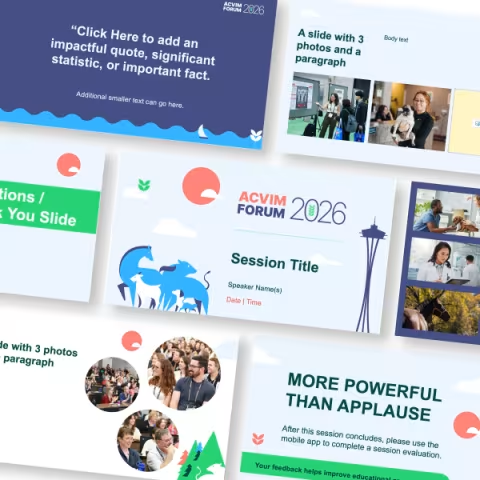
All presentations should be created in PowerPoint™. A standard template is provided below for speakers to use that is set up in a 16:9 aspect ratio. This template contains a variety of slide layouts and cover options to meet all your presentation needs.
If you choose not to use the provided template, please make sure your presentation is in a 16:9 aspect ratio in order to be supported on the conference platform. In addition, please ensure you have the following within your presentation slides:
- Presentation title and speaker slide
- Conflict of Interest slide
- Questions/Final slide with names and contact information for all speakers
- We encourage you to include a slide reminding attendees to complete the session evaluation.
Slide for Land & Labor Acknowledgement (optional)
Research Abstract Presenters
Oral Presentations
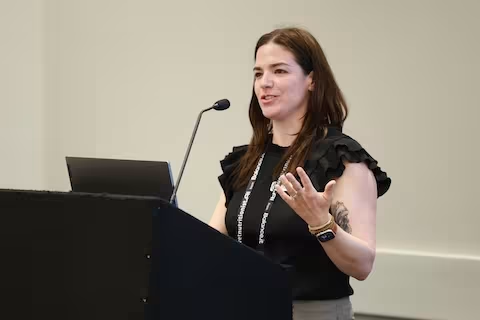
Oral research abstract presenters are scheduled throughout the ACVIM Forum and Specialty Symposium Day. Presentations are 15 minutes in length with 12 minutes allotted for presentation and 3 minutes for Q&A. Presentations will bemonitored with a speaker timer.
Speaker Portal for Research Abstract Oral Presenters
Poster Presentations
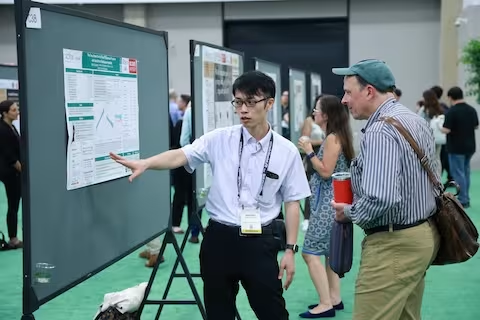
All accepted poster presenters are required to submit a digital ePoster. Additionally, every poster presenter has dedicated timescheduled throughout the ACVIM Forum where they are expected to be available in-person for Q&A.
Poster Portal for Research Abstract Poster Presenters
#BetterPoster Format
The ACVIM continues to recommend the #BetterPoster format for all poster presentations, which promotes engagement and communicates findings quickly and effectively. Explore the following resources to learn more.
Resident Research Abstract Awards
The ACVIM is proud to partner with the Purina Institute in providing awards for the best resident research abstracts for eligible ACVIM Candidates. Winners will be announced and recognized on stage Friday, June 12, at the ACVIM Awards Luncheon. Please include this event in your schedule. Resident Research Abstract Award winners receive a $1,500 cash award and an additional $1,500 to support travel to attend the 2027 ACVIM Forum in Montreal.
Sponsored by

Tips for an Effective Presentation
Less is more - Your slides should contain a minimum amount of information; your slide notes, on the other hand, will contain far more content. Uploaded resources will have the most content and detail.
Avoid PowerPointsless - Create slides that are complementary to your remarks, not identical. Use slides as a canvas for visual representations, graphics and photos and avoid simply "echoing" your slides in your talk.
Keep it simple - Focus on one idea per slide and remember that the number of information chunks we can recall at a time is "Seven, Plus, or Minus Two." Assemble your presentation slide in seven chunks, plus or minus two.
Extend the conversation - It's OK to include "information" slides with resources and the like, but don't spend time presenting that content. Upload additional resources to your session or create a handout.
Practice, practice, practice - There is no substitute for advance preparation. Practice your presentation before your colleagues and review your session description to ensure that your presentation mirrors what has been promoted.
Helpful Resources
"Best Practices For Virtual Presentations: 15 Expert Tips That Work For Everyone" - Forbes.com
"10 Tips for Giving Effective Virtual Presentations" - Stanford.edu
"Really Bad PowerPoint" - Seth Godin's Blog
"Copyright - What Can I Legally Use?" - ThinkOutsideTheSlide.com
"Five Tips for Presenting When You’re Wearing a Mask" - Associations Now